Friction on new projects

As the last post mentioned, I have been involved in a new project at work so it has been a good opportunity to introduce the team to some new concepts and investigate a few things my self.

Firstly the good:

  • The last post mentioned that I have cleaned up the way we do stuff in terms of “code on the page”. Its always good to be able to clean up coding standards
  • introduction of IoC using Structure Map. I choose SM as I felt it was one of the most user friendly for those un familiar to IoC. I have used the Castle a fair bit however, what is good for me is not necessarily best for the team.
  • Introduction of Rhino Mocks. Even though at work we are still .Net 3.0 Rhino Mocks we felt was a good choice over NMock2 as it has more fwd compatibility and the strong type of the delegates is well received (I hate strings)
  • A much more refined user friendly architecture and overall structure

The Bad

The Friction on TFS, MSTest and MSBuild has been, to be honest, amazing. If the same project was using SVN, Nant and (N/Mb/x)Unit the CI would have been trivial, 30mins if all went well and maybe a couple of hours if things got a bit hairy. Not so with this nasty little threesome. TFS in itself is pretty good at combining check-ins with bugs/tasks and it has a nice interface. However the price tags and the pain in the ass it becomes when anything else needs to be done is just silly. MSTest, well does any one like it? As for MSBuild, well I don’t mind it, I just prefer Nant as my main build script

So if you are going to go Greenfield be sure to check out what you need to do to get the whole system up and running. Unfortunately the powers that be a petrified of any OSS entering the realm of their MS world… I should probably keep quiet that the ORM, IoC, AOP, Logger and who knows what else all fall in to the banished category…

So this week I guess I will have the fun of putting my fingers in to all of this mess. I am not really sure where to start.. CI Factory? Until then we just have a continuous compiler
Cleaning up bad NHibernate/DDD practices

I have of late managed to be involved in a new green-fields project at work. I am sure everyone can relate to the elation you get when you have the opportunity to work on something new an “do it properly this time”. I have had the privilege of being able to set everything up how I wanted. Not being a complete ass I have tried to get the team involved as much as possible and explain why/how I am doing things along the way. I think the thing I have found most enjoyable is setting up the means to creating a decent domain.

For the first time we have

  • A clear delineation between value types and entities
  • real value types
  • generic repositories that only allow entities*
  • protected empty constructors on all entities forcing you to construct the entity with the more public greedy constructor that actually puts the entity in a valid state
  • Corrected sub classing of entities when behaviour is different for different types
  • Non insertable type field on subclasses (that match the discriminator column) so the guys can still query “the old way”**
  • Protected setters by default
  • DBC that matches our DB & business constraints, down to the setter level
  • A serious drive to push DOMAIN logic in to the DOMAIN objects
  • Specifications

This is all pretty basic but these key aspect were not in our last big project. It may sound like having one repository per aggregate root would be a hard thing, but to be honest its a good thing and the headaches it could have saved my on the last project; NHibernate issues (transient state/dif object same id etc) and more importantly undetected business rule errors in the code.

What I am really hoping is that now the the hard work has been done that the team can more clearly see why we do things in the way we do them.

*I need buy in from the team on the whole Entity/Value type thing before dropping the Aggregate Root bomb shell

**Again this is perhaps not the best way to do it, but I feel for the moment its the best way for the team, while moving in the right direction

Open source projects: Current Favourites

MbUnit: my new prefered Test framework
RhinoMocks 3.5: Liking the new syntax
MassTransit: Even if just for making Asynch and MSMQ easier
Suteki: ASP.Net MVC CMS (can i get any more TLAs in there?), I’m currently trying to port from MVC3 to MVC 5, but the demos look cool.
MVC Contrib: Even if its just so i can bolt Castle in .. so sweet!
NAnt: I still havent had any reason to move to the “cooler” *ake tools as Nant is just easy.

Things that are not Cool:
MSTest, TFS
I hate both of you. :p

TDD: Fail fast

It has been brought up numerous times over the last few months about the failures of TDD for the masses. It has been proposed the the masses are not in fact test driven. It seems the majority of these failing to get the benefits of TDD fall in a couple of camps.

One camp is throwing in the occasional test if it happens to cover an area of concern. This is usually not Test Driven but retro fitting tests.

Another camp is the “over testing” camp, going for the “holy grail” of high code coverage often leading to:

a) Tests that don’t test anything that needs to be tested. Common examples I see are testing frameworks you didn’t write (i.e. NHibernate or System.IO) or testing property assignment worked etc

b) Brittle unmaintainable tests that soon become a mass of failings tests.

For some reason it appears the barrier to entry to real TDD is too high. What I plan to cover here is all the mistakes you will probably make when picking up TDD. By acknowledging these mistakes early, hopefully you can over come them and improve the way you approach testing.

  1. The first mistake many make is not knowing at all what they are doing. Get Kent Beck’s TDD book and read it. Don’t stop at the 3rd chapter, it really is one of the easiest books I have read in the last few years. It a quick read, in plain English and cover 80% of the tests you will be writing. It amuses me that people are too pig headed to learn how to do something correctly that they are supposed to be doing all day (and are paid to do!)
  2. Decide how you are going to be using tests as part of you design process. Be honest with yourself. If you know that you are not going to be truly TDD and write tests first then don’t pretend you will. No one is watching over your back, karma wont bite you. But seriously if you haven’t tried it, start up a side project at home and give it an honest bash. Make the mistakes on something that “doesn’t matter” so there is a boss looming over you as you rewrite brittle tests. If you are not going to use TDD you can probably stop reading now. 🙂
  3. Make TDD part of your evolving, agile design process. TDD for me now is also a major part of my design process and one of the key reasons I use it. I generally have an idea of what I want but often TDD pushes me to a better design than I had first envisaged. Classes and methods become cleaner and more focused, interactions more expressively conveyed.
  4. Decide if you are going to use doubles*. This is an extra aspect of TDD to learn and is usually where things go pear shaped. Not using doubles in an enterprise environment usually means you are doing integration tests, test that call multiple classes, methods and layers. Integration tests can be slow as they often interact with databases, file systems and other services. They can also be brittle as they rely on the environment being in a constant state. Changing something in the database or a class several layers down may incorrectly break a test which means test that are hard to maintain.
  5. Understand Doubles. Whether you use them or not you should try to learn to understand what they mean. Doubles help you write Unit tests when a piece of code has dependencies. A unit test should test a unit, not all the stuff hanging off of it. I am not going to go into great detail here as it is covered by Kent, Martin, Roy, Gerard and the rest of the TDD community with an opinion. The two I use most commonly is the Mock and the Stub. A stub is a place holder that returns stuff when you call a dependencies specific method. Stubs don’t cause test to fail, they just allow them to proceed with a more shallow dependency than you would otherwise use. A mock, like a stub, mimics a dependency in returning predefined results from a specific call, however mocks can break a test. Using a mock you are saying I EXPECT this method to be called on this dependency and if it is not, this test should break. This is where lots of people go pear shaped. People tend to “Over Mock”. If it is not critical that a dependencies method is called then it is not a mock expectation, it is probably just a stub. See Ayende’s write up on how Rhino Mock 3.5 moves to help with this. If you are not using Rhino Mocks, give it a go. The dynamic mock is worth it alone.
  6. Don’t over Assert. An Assert is the test frameworks way of asserting the SUT’s state. A good clean test will be short and ideally have one assert. Now this is not always the case, however if you are seeing tests with dozens of asserts becoming common place it is time you have a closer look at what you are testing.
  7. Don’t over Expect. Following in the same vein as above, if you have more than, say, 3 mock expectations in one test you may need to re think your design as that is a lot of interaction for one piece of code. Again I try to keep my expectations to 1 or 2 per test.
  8. Run test often. Now many of you will be using Visual Studio Team System and therefore may be inclined to use MSTest (the built in test framework). That’s cool, as long as it doesn’t slow you down. For me, its way too slow. I am currently running a NAnt build script with MbUnit + RhinoMocks to build and test. This thing is fast and only runs my units test, not my integrations test. I run this script every couple of minutes, as that’s how long it should take to either write a test or fill in the code to make the test pass. If your “build and test” turn around is more than a few seconds, you probably wont be doing it to often, which obviously affects you adoption to TDD. Some easy wins include: Having a smaller solution (with only projects you need in the build & test process), using a build script instead of VS to build & test and of course minimising your integration tests, focusing on faster unit tests. Its probably wise for me to say that I do have integrations tests, but I try to minimise them and only run them a couple of times a day, not every build cycle. A perfect time to run them would be as part of your check in process (which I assume you do reasonably often).
  9. When a test breaks: Tools down, fix the problem! If you have just made code changes and new Red light come on, this is bad! Only one red (failing test) at a time please! Enough said.
  10. Refactor! Refactoring  means better code. More readable and better performing sounds like great things to me, especially in the safety of a test suite to assure you the end result is still the same. It also highlights if you have brittle tests. When I first wrote tests I didn’t refactor that much, as it often broke the tests. This was a mistake. Instead of “not refactoring” I should have addressed the root issue, which was brittle tests. Flying solo while doing this can be hard. That’s what forums & user groups are for. Show the world your mistakes so you can stop making them**. You will probably find dozens of other doing the same thing and not realising it.
  11. Help team members get better at testing. Teaching others also helps you gets better as it highlights gaps in your own knowledge. The main benefit is the cross pollination of ideas and concepts with in your team. If one team member is spending a lot of time rewriting tests it is a sign that they are missing a concept. Maybe they are not using doubles correctly? maybe they are retrofitting tests
  12. Keep set ups and tear downs small. If you set ups are massive then your SUT is probably to coarse and need to be broken up to more manageable bite. Typically my set ups have a class fixture wide mock assignment (for fixtures that focus on the same dependencies) and teardowns only have a mock verification if I have one at all.
  13. Don’t think TDD will come in a couple of hours. It doesn’t. I have heard comments from others and tend to agree to make all the mistakes and come to the point where TDD is a natural progression takes about 6 months of standard 9-5 developer time. If you are an uber nerd maybe shorter as you may be writing some code at home or you just bash out more or you get concepts faster. I wrote my first NUnit test about 18 months ago and first played with A mocking framework 5-6 months later. for most of that time I was running blind and had really, no idea what I was doing. only in the last 6 months have I become very confident in my TDD ability, by reviewing my and other people tests can you see where and why you are doing things wrong. I am not the TDD guru but there is not much that I write now that I cant test (that I want to test!)

Although this is by no means a comprehensive list, it does give you pointers as to where you may have problems with your tests. I figure I would rather fail fast (if I am going to fail at all) so hopefully these pointers give you an idea to which paths you should not be going down.

As a side note: It is now habit writing tests as I go. This doesn’t come at first but pushing thru the initial barriers and you will get there. I don’t always follow the “Red, Green, Refactor” as sometimes I just write the test, write the code and run green. But when I first started I found the red aspect helpful.

Hope this helps get someone on to the TDD bandwagon a little easier and little faster.

RhysC

*Doubles include fakes, mocks, spies, dummies and stubs.

**Not all your mistakes, then the world just thinks you are a clown

Eset + Asp.net = :(

I installed Est Smart Security after years of benefit from Nod32 on my XP dev machine. Well the results were not quite the same. To be honest within 10 days it got uninstalled… 5 of those days I was not in the same country as my dev box… disappointed to be honest. 😦

Alt.Net UK Conference

This weekend the UK Alt.Net conference was held in London. It was a good meet up with some interesting topics. I must say I didn’t really know what to expect as there were not as many “names” attending as there was at Seattle (which is to be expected). Being my second Open Spaces event I felt more comfortable in the type of environment and was able to engage with a bit more confidence which was good.

Friday night basically covered Alt.Net and what it means to various people. I cant really say I got much out of this other than some people feel there is an identity crisis and too much bickering. I believe we are just pragmatic, aware and evolving developers, nothing more. I also feel that some of the bickering is just side effect of the type of people involved (i.e. driven, intelligent and probably very confident) and the means of communication (written, not verbal in which tone can be ascertained). I think we should just deal with, minimise it and move on.

Saturday was the actual sessions. I attended

  • Build/Deployment/CI
  • OSS ESBs (NServiceBus & MassTransit) and BizTalk
  • DDD
  • BDD and acceptance testing

From the Build talk I learnt about Some DB tools to help with deployment which is a stress point for us. It also sounds like TeamCity is fast becoming a preferred CI tool. The point was raise that many teams do not have any means to automatically test post deployment, i.e. is what we have rolled out actually working correctly, I thought this was particularly important, mainly because I have never really done it.

Unfortunately the ESB talk was a bit light. I was hoping (like most) that there were some users who had some pretty deep knowledge on either NServiceBus or MassTransit. There was only two of us that had even used them so we gave a brief of what they are and how we have found using them. I felt the talk got side lined as to when to use Asynch operations and then comparing to BizTalk, which I feel is like comparing apples to oranges, especially the price tag. A point the was made is that they (NSB & MT) make using MSMQ a lot easier, and to be honest, I think they validate themselves in this functionality alone. Some of the guys wanted a brief demo of MT: Check it out here. The original samples are in the download here.

I enjoyed the DDD talk most where Ian Cooper took the reigns a bit walking through the concepts as the vast majority had not actually read the blue book. This to me was good as it kept everyone of the same page. The number of DDD talks I have had with people that don’t know what an aggregate root is is somewhat annoying (and that’s only this year). I should clarify that its not that its annoying that they don’t know, its annoying they are using the term DDD inappropriately. It was then highlighted that implementing of all aspect of DDD is overkill for many application, which is rightly so. Aggregate Root, Specification, Anti-corruption Layer, Shared Kernel and Bounded Context were all defined for those not familiar with the book. Discussions about Generic Repositories came up and how marker interfaces could be used to limit the use to Aggregate Roots, which I like. Messaging came up as a means of not letting domain concerns leak into the application and cleaning up responsibilities. I am a huge ANTI-fan of entities in the application. Use messages where possible, especially in a disconnected scenario. Refactoring is easier, maintenance is easier and the intent is much more clearly defined. A point was raised that NHibernate intrinsically leads to an anaemic domain, which I don’t buy for one second. NHibernate does not stop you changing accessibility to properties (thereby avoiding property chaining), stop you adding rich functionality to entities, or force you to push logic to services. I think I either misunderstood the sentiment or there is a misconception in the functionally of ORMs.

BDD discussion basically turned to an acceptance testing talk. I am not going to lie, I was tired by then and wanted to go. The chat was relevant but I had been up since 6am packing, as we were also moving house that day. I think BDD is something that hasn’t hit the mainstream as it seems to have too high a barrier to entry. Whether this perception is accurate, I am not sure. I like the idea of BDD but I am yet to jump in feet first, I will take from it what I want a continue along my happy way.

Thanks to everyone who attended, it was enjoyable.

Build Configurations

More build fun!
Having a chat with the lads at work and I was surprise that the Debug/Release option on Visual Studio was not a well understood build feature.
Debug and Release are just build configurations that can be modified. You can also add build configuration to fit your needs.
I follow the TreeSurgeon pattern (now out of habit) and create a new configuration eg AutomatedDebug and set up my build preferences there.
What are the benefits of doing this I here you ask?
• Ease of deployment
• Have a configuration for each deployment environment

Those for me are enough reason to do this. This build config and my nanat script means I can
• Build the solutions quickly
• Optionally run test based on category and optionally use code analysis tools (FXCop, NCover etc)
• Has all the dll’s in one place
• Have all tests dll’s in one place, separate to the production dll’s
• Have all my test reports in one place
• Have a distribution zip file with all I need (and nothing I don’t) to deploy the solution (dlls, config etc)
• Have the containing folder of all of this delete-able and be able to replace everything and not required to be in

It takes one click of to do this.
Well this to me sounds like its pretty hard to setup… I know it did because I was very reluctant to set it up… but it really wasn’t that bad and the time I have saved has paid me back 10 fold and continuing to do so.

If you want to try this approach on a clean soln just download TreeSurgeon from codeplex and get to it. You may have some issues with Ncover (I did). There are solutions on the web to fix it, but if you cant be bothered then you can just use NUnit and not worry about cod coverage.

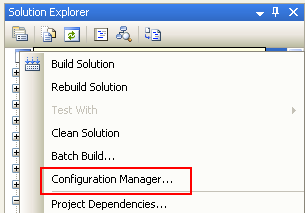
Alright to do this with an exiting soln, right click on you soln in VS and select “Configuration Manager…”.

Under “Active Solution Config” drop-down select NEW.


You will get a pop up. Give the config a name eg AutomatedDebug and inherit from debug (my preference). Make sure the “Create New Project Config” check box is checked so all the projects get access to this build config.

Hit Ok and you will now see the active config is AutomatedDebug (or whatever you called it). Close the config manager and you will also notice that in the drop down box for soln config (in the VS tool bar) has been set to AutomatedDebug.

The next step I personally take is setting up all the projects in the solution to build to a standardised place. At the root of solution (ie in the trunk folder) I have a bin folder that is NOT under source control.
In this folder after a build using the AutomatedDebug configuration, I have “AutomatedDebug”, “AutomatedDebugTests”, “AutomatedDebugReports” and “AutomatedDebugDist” folders. In each of my production projects (i.e. not test project etc) I set the build location as a relative path to the AutomatedDebug bin folder eg
..\..\..\bin\AutomatedDebug\
Whereas all of my test projects are built to
..\..\..\bin\AutomatedDebugTests\
I do this to keep things clean for me; you can just dump everything in one folder if you want.


This now means you can call a build on your soln file using the new config from Nant (or whatever build tool you use).
Snippet:

The other folders are created when running test and compressing relevant files to a zip file.

Deploying is now very easy, as is rerunning test as all your test are in one place, however to be honest the targets I use by default build and run all test every time.

Style Cop and VS Defaults

I have been playing with Microsoft new(ish) code analysis tool StyleCop over the last couple of nights (god forbid I use it on our work code base!). Its a pretty cool tool in the same vein as FXCop but with more of a focus on general code layout etc. In this regard its pretty cool. It gives you warnings for when rules are broken & it integrates into VS quite nicely. Unfortunately there is no clean way of integrating it into my NAnt scripts as there is no exe to call. Apparently you can put it into your MSBuild scripts, but that’s kinda weak that they have not provided an exe for other means… any who…

It also highlights the fact that VS default templates do not adhere to the StyleCop rules. If you run StyleCop over a standard code base you will see a bunch of warnings straight off the bat. Firstly there are no file headers on any standard C# file.

An XML type header need to be placed in every file. This to me stinks of C headers… are we not a bit past this? Is this really required? There are copyrights on the project in the assembly file, do we need the clutter on every single file (and repeated in the AssemblyInfo.cs twice)?

Well if you do then feel free to add a header similar to:

//
// Copyright (c) 2008 All Right Reserved
//
// Rhys Campbell
// rhysc@fullstack.co.uk
// 2008-09-10
//

Contains assembly information.

It also points out the VS, by default, places the using statement on the outside of the namespace which the pigs don’t like!

Fortunately there is an easy fix to these and other default behaviours: Templates.

Visual Studio has configurable templates for the files it creates, so you can modify the standard output to what you want. These template reside as zip file in the C:\Program Files\Microsoft Visual Studio 9.0\Common7\IDE\ItemTemplates\CSharp\ folders and are actuall cached near by in the ItemTemplatesCache folder. You can make your own personal templates and by default they hang out in C:\Users\Rhys Campbell\Documents\Visual Studio 2008\My Exported Templates\.

Say for example we wanted to trim the  StyleCop warnings of our projects down a bit then the above examples could be changed from

using System; 
using System.Collections.Generic; 
$if$ ($targetframeworkversion$ == 3.5)using System.Linq; 
$endif$using System.Text; 
namespace $rootnamespace$ 
{ 
class $safeitemrootname$ 
    { 
    } 
} 

To something like :

//
// Copyright (c) 2008 All Right Reserved
//
// $username$
// $username$@fullstack.co.uk
// 2008-09-10
//


namespace $rootnamespace$ 
{ 
using System; 
public class $safeitemrootname$ 
    { 
    } 
}

To do this just crack open a new class, make the changes to the layout you want using template parameters in logical places (i.e. class, namespace, date etc) and File > Export to Template… *

You can select the namespaces required and even pick a pretty icon for your new template. This is particularly good if you use a bunch of standard classes (Tests, NHibernate, WCF all spring to mind) and it should speed things up nicely 🙂

To use you new template Just Add a new item to a project and under all the standard templates will be a “My Templates” section with your new tempate happily residing.

*If your Export to Template, like mine, is not there, go to Tools > Customise and drag the command from the depths of the hidden file options on to the file menu drop down (i.e. Commands > Categories=File > Command = Export Template..)